
If you’ve never encountered the term before, a keyword gap could be anything. So what is it?
A keyword gap is a keyword or keywords that one site ranks for that another site doesn’t. Keyword gap analysis is a form of competitor research and is fundamental to any content strategy. In short, you identify a competitor or competitors, then use a tool like Semrush to run a keyword gap analysis. You can also check manually, page-by-page, the keywords that a competitor has used with a browser extension like SEOquake. You then use what you learn to create a new landing page/blog content plan.
That sounds simple but there’s a lot to it. If you want to know more about keyword gap strategy, how to see what keywords a website it using, how to check what you’re ranking for and how to create a fresh content plan with what you’ve learned, read the post below. It’s a long one!
What is a keyword gap analysis?
Keyword gap analysis is the name for the process of systematically looking at your competitors and identifying any keyword gaps. If you’ve come across the term content gap analysis, SEO folks use the two pretty much interchangeably, though “content gap” leans slightly more towards missing pages and topics than individual keywords.
Keyword gap analyses can be loose and casual or thorough and formal. On the more informal end, for a new client I might take a look at their site, then take a look at a few of their competitors sites, just over a cup of coffee. I might notice that the way they structure their site is a little different to my client, for example if they have a service page my client doesn’t. If so, I’ll look at the service page, identify what keywords they seem to be trying to rank for, and see if the client is trying to rank for those somewhere (e.g. on the homepage or a different service page). This would take a few minutes and would be the first step before further analysis.
On the more formal end — which we’ll look at in more depth in a moment — you can use a tool to look at the entirety of a client’s site, the entirety of a competitor’s site (or multiple), and create a full content and landing page plan which highlights current keywords vs. missing keywords.
Why should you use a keyword gap strategy?
Competitor gap analysis is a viable strategy for a few reasons:
- It helps you get more traffic
- It identifies opportunities that competitors are already taking advantage of
- It’s an effective method of content planning
- It’s an intuitive baseline for SEO work (“before you started SEO, your keyword gap was this big, now it’s smaller — hooray!”)
- It’s something you can do on your own for free (rather than pay hundreds or thousands of pounds for)
You already want to do what your competitor does, but better, so applying the same thinking to your SEO makes sense.
How to do keyword gap analysis
Conducting a competitor keyword gap analysis used to be hard, but now there are tools that can do it all for you. Let’s run through how to use one of these keyword gap tools — Semrush.
How to run a keyword gap analysis with Semrush
Semrush is a third-party SEO tool (not a sponsor) that gathers data on sites, backlinks, AI mentions, and all that good stuff — it’s more a generic digital marketing tool than just SEO, but since we’re an SEO agency, SEO is what we use it for. If you want to know how to check what keywords a website ranks for, either for a keyword gap analysis or any other reason, it’s a good go-to. Let’s get started with the Semrush Keyword Gap tool. Here’s what it looks like:
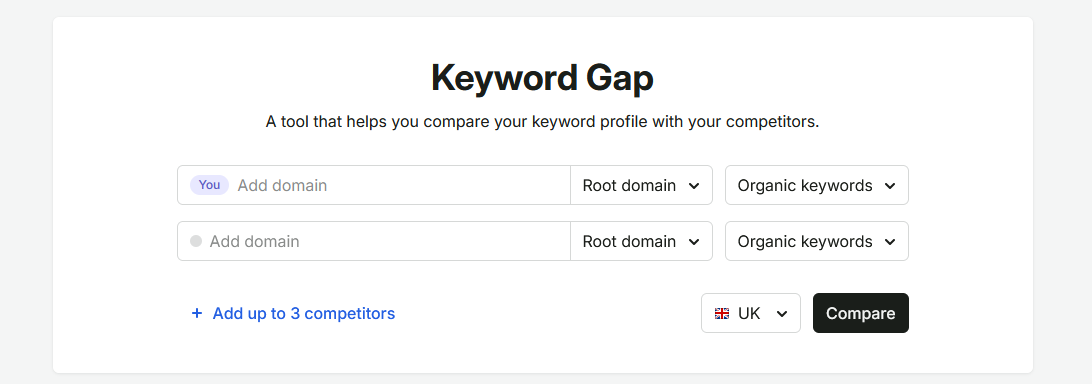
You start by adding your domain, then adding up to four competitors. You then select the location (which should be UK already, if you’re in the UK) and clicking Compare. It will take you through to a page that looks like this:
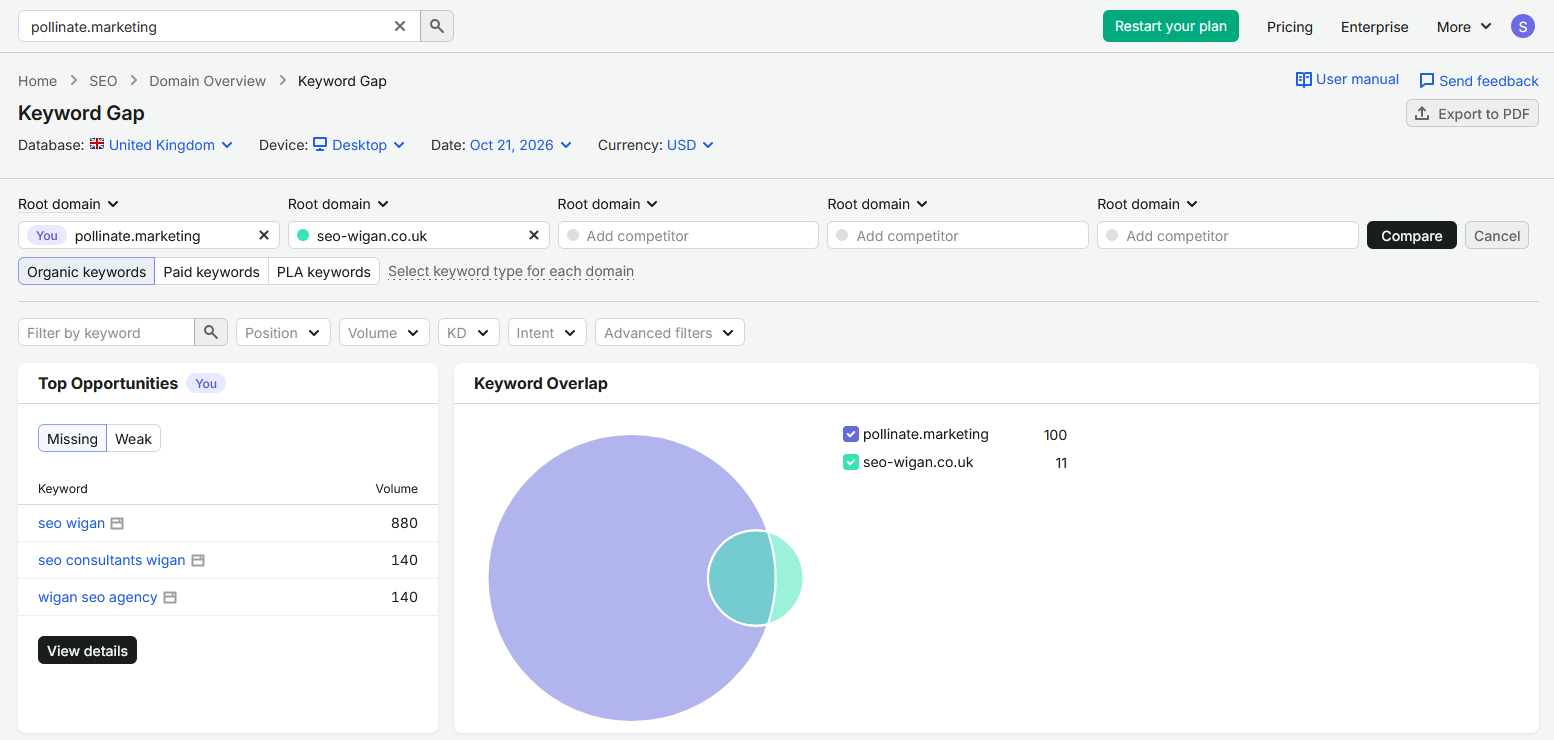
Starting on the right, it shows you “keyword overlap”, which is basically a Venn diagram. It shows you how many keywords you and your competitor rank for, and how much overlap there is. In this case neither site ranks for that many (yet!) and there’s significant overlap. Basically a handy at-a-glance chart. On the left you have “top opportunities”, which are things that your competitor/s rank for that you don’t, or that they rank for better than you. Again, useful at a glance. If you scroll down, you’ll see a table that lets you look through the keywords in more depth:
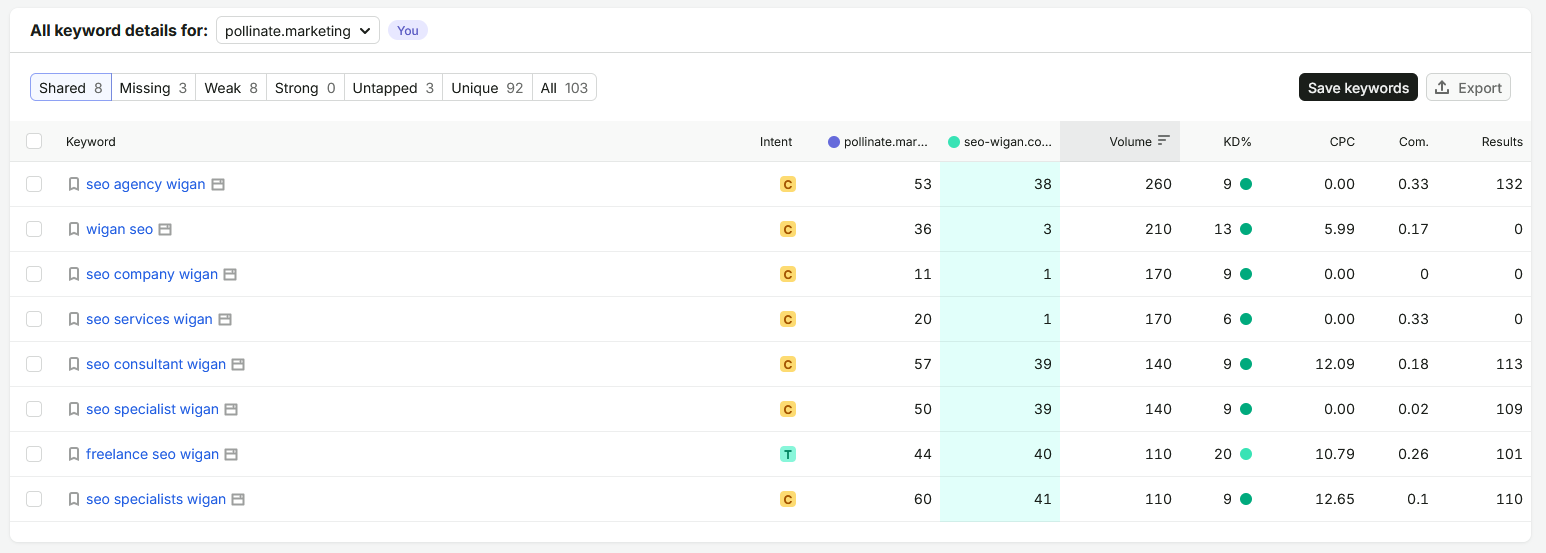
So, starting with the table.
- We have the keywords on the left
- Then the “intent”, i.e. what the searcher is performing the search for: to learn something (I for informational), to find their way somewhere (N for navigational), to compare products or businesses (C for commercial) or to buy something right now (T for transactional)
- Then the position that each of the sites ranks for that particular keyword
- Then the monthly search volume that the keyword gets in the specific location you searched for, which here is the UK
- Then the KD%, which is keyword difficulty. The higher the KD, the more difficult it will be to rank for
- Then the CPC and Com, which are to do with paid ads, so aren’t relevant here
- Then the “Results”, which is how many URLs appear in search results for that query (which here seems to be wrong — some give 0, which is incorrect. Semrush isn’t perfect)
Then at the top, we have the filters. At the moment the filter is set to “Shared”, which lists the keywords that all the competitors rank for. There’s also missing (ones that you don’t rank for that they ALL do), weak (which you do rank for but poorly compared to competitors, weak (the opposite), untapped (where you don’t rank but AT LEAST ONE competitor does), unique (that you rank for and they don’t) and all (just all of the keywords listed). None of the filters apart from “shared” are available on a free account, but you at least get some interesting insights.
How to find keywords on a webpage (manual keyword gap analysis)
If you fancy trying to close a keyword gap the old fashioned way, you can. In fact — there are good reasons to, the main one being that you get a great feel for your competitors that you don’t when you have a third-party tool do all the hard work for you. And it IS hard work, but if you’ve got the time, it’s worth it. It’s like competitor research but with a specific SEO angle.
Here’s how to check keywords on a website like its 1999!
1) Prep
First things first, let’s get prepped.
Start simple by picking out the competitor or competitors you want to perform a keyword gap analysis with. I would recommend you start with two, one of which is a close match organic-performance-wise to where you are now, and one which is roughly where you want to be at the end of the campaign. Running a keyword gap analysis with your own site (whacked up six months ago, no backlinks, no rankings) with an industry giant isn’t going to tell you much worthwhile, because, yeah, obviously they rank for all the huge high-volume terms that you don’t. You want a more achievable target. Then again, if you want to go big, you do you.
Next, you need to add an SEO extension to your browser. I would recommend SEOquake. SEOquake is is a free extension you can get from the Chrome Web Store that gives you tons of useful insight into whatever webpage you’re on. You can access all of this data manually by checking the page source yourself, but the point of an extension like SEOquake is that it gives you everything you need at a glance, including a bunch of stuff that’s useful for you here, including page titles, meta description, heading structure and keyword density (more on all that later). Install it for now and we can move on to the next step.
2) Set out your Google Sheet/spreadsheet
Now you’re going to set up a spreadsheet. We like Google Sheets because they’re easier for multiple people to work on, but if it’s just you, and you don’t fancy moving on from Excel, you don’t have to. Any spreadsheet software will do the trick; the tables you’re making are quite simple.
Start by making a table for your current site. In the first column, list the names of each of the pages (e.g. Manchester location page, Divorce service page, etc.) In the second column, add the URLs. In the third column, add all the keywords each of these pages ranks for. You can get the data from Search Console.
You then want to make similar tables in other tabs, but for your competitors. Add the page names and URLs, but leave the keyword cells blank for now — these are what you’re going to fill in manually.
3) Go through your competitors one by one
Next, you’re going to look through your competitor’s sites with your SEO browser extension active. We’ve used SEOquake but you can use whichever tool gets you similar information.
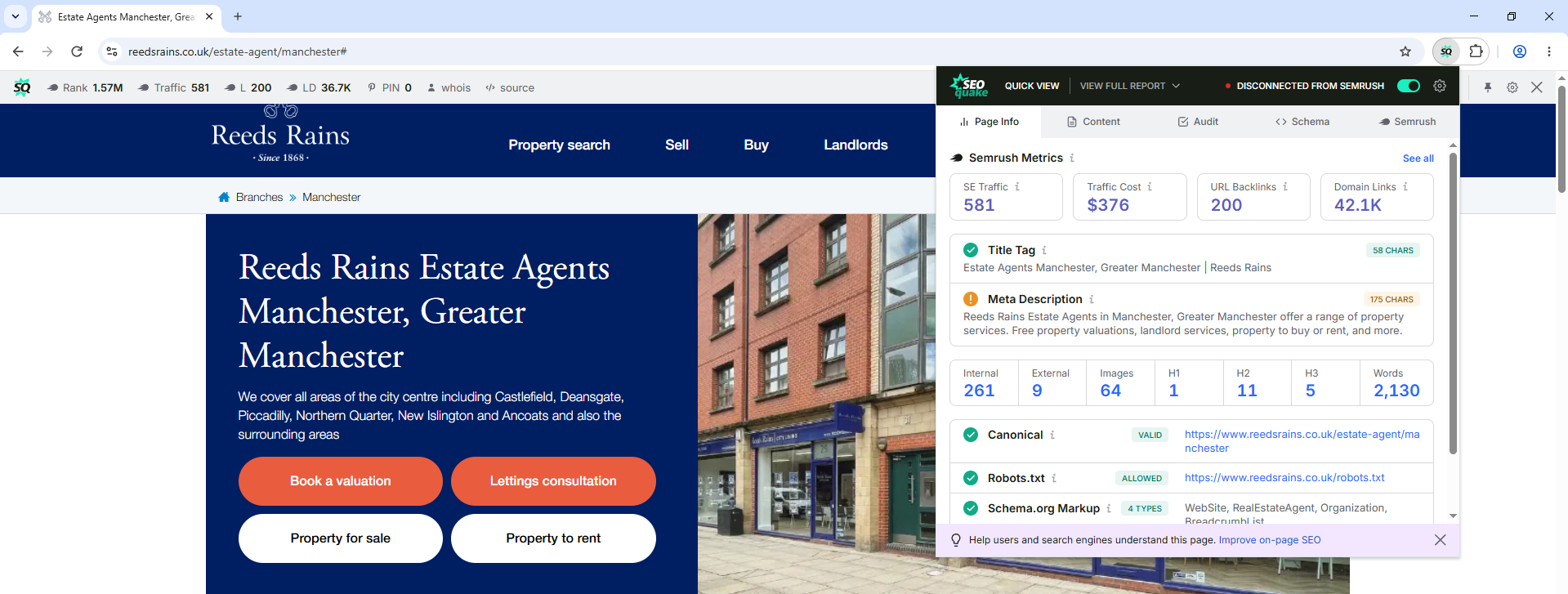
So, starting with the “Page Info” tab, we get the title tag and meta description. On any well-optimised site, the page title will contain the primary keyword for that page. In this case, the Manchester location page on the Reeds Rains site has “Estate Agents Manchester, Greater Manchester | Reeds Rains” as its page title. “Estate agents Manchester” seems at first glance like a great candidate for a primary keyword for the page, anyway. And if it’s one that you aren’t ranking for or haven’t targeted, fantastic: that’s the first useful keyword you’ve found in your gap analysis. Add it as a keyword related to this Reeds Rains page in your spreadsheet.
If you then go to the “Content” tab, you’ll see a few things, first of which is the heading structure. Again, well-optimised sites use keywords in their headings, particularly their H1s. The H1 here is “Reeds Rains Estate Agents Manchester, Greater Manchester”, which is doing a couple of things; first, it’s using the same keyword as before (estate agents Manchester). Good, that’s another signal. Second, it’s using the brand name, so that this page is optimised for any Reeds Rains + Manchester keywords (Reeds Rains Manchester, Reeds Rains estate agent Manchester, etc.) Other keywords in their headings like free online house valuation, landlord services, why move to Manchester, and more may all be worth adding to your sheet.
The idea is to repeat this process for all the relevant Reeds Rains pages, and for whatever other sites you’re looking at in your keyword gap analysis.
4) Integrate new pages and keywords into your own site plan
Once you’ve looked through the entirety of your competitors’ sites, it’s time to act on what you’ve learned. Compare what you found, starting with the landing pages and blogs: what pages do your competitors have that you don’t? It’s not optimal to simply take all of your competitors’ keywords and add them to your existing pages, if there are more relevant pages they might belong on that you don’t have. So, start there.
Then, go through the rows in your competitors’ tables one by one and add their keywords to wherever they fit best. I would recommend adding a separate column titled something like “Keyword gap keywords” or “Competitor keywords”, just so you can cleanly differentiate between new keywords and old keywords, if you had any. If you’re worried about duplicate keywords, wait until you’ve finished the table, then paste it into your LLM of choice (I would use Claude) and ask it to spot any dupes. That’s the kind of thing they’re good at, and it’s a quick shortcut if you don’t like Excel functions or the Google Sheets equivalent. If you do, either go through row by row editing them if there aren’t many to remove, or have it spit out the full table for you that you can copy and paste in.
So, there’s a lot more work involved in this method than in just asking Semrush. But hopefully you can see how this would a) give you some great insights into how your competitors built their sites, and b) help you learn a little bit about SEO along the way.
How to close a keyword gap
Let’s say you’ve run through the process above and you’ve got a big list of competitor keywords that you don’t rank for. Here’s how you would best go about closing that keyword gap.
- Identify where to add each keyword to your content plan. There are two ways: you can either target the keyword with an existing page, or with a new page. If you already have a relevant service page, and the keyword comes from a competitor’s service page, you should add it there. Alternatively, the gap may make it clear that you should target a cluster of keywords with a service page (like your competitor) that you were trying to target with your homepage. Which is best depends on what you find.
- Write fresh content and/or rewrite old content. Then either add it to the existing page or create a new page. Remember to add it to headings and maybe even the page title, if it has enough search volume to work as a primary keyword.
- Request indexing/reindexing of the page through Google Search Console. Google will eventually pick up on the changes you’ve made regardless, but it’s better if you speed the process along by manually requesting indexing.
- Add internal links that point to the page you want to rank. Crucially, use the keyword you want to rank for (or close variants of it) as the anchor text. For the uninitiated, the anchor text of this link is “this link” — the words that you click on to follow the link. Google treats anchor text as a strong signal for what the page is about.
- Build backlinks that point to the page you want to rank. The same applies here with anchor text, too. Backlinks are yet another signal (if not the strongest signal) so don’t slack on them.
If your site is already indexed, this should be enough to encourage Google to reindex your pages in somewhere roughly from a day to a week. You should then start seeing improvements for the keywords you optimised for.
Track keyword performance with Google Search Console
The next step is to track whether you’re ranking for these new keywords. There are a few ways to do this, and a few different tools you can use, but the best is definitely Google Search Console (GSC). That’s because GSC uses real data from your site rather than estimated or out-of-date data from third parties like Semrush and so on. Also, recently, Google has made it far harder for keyword tracking tools to do what they do — but that’s not quite within the scope of this post! Either way, it’s best to use data from GSC/your own site.
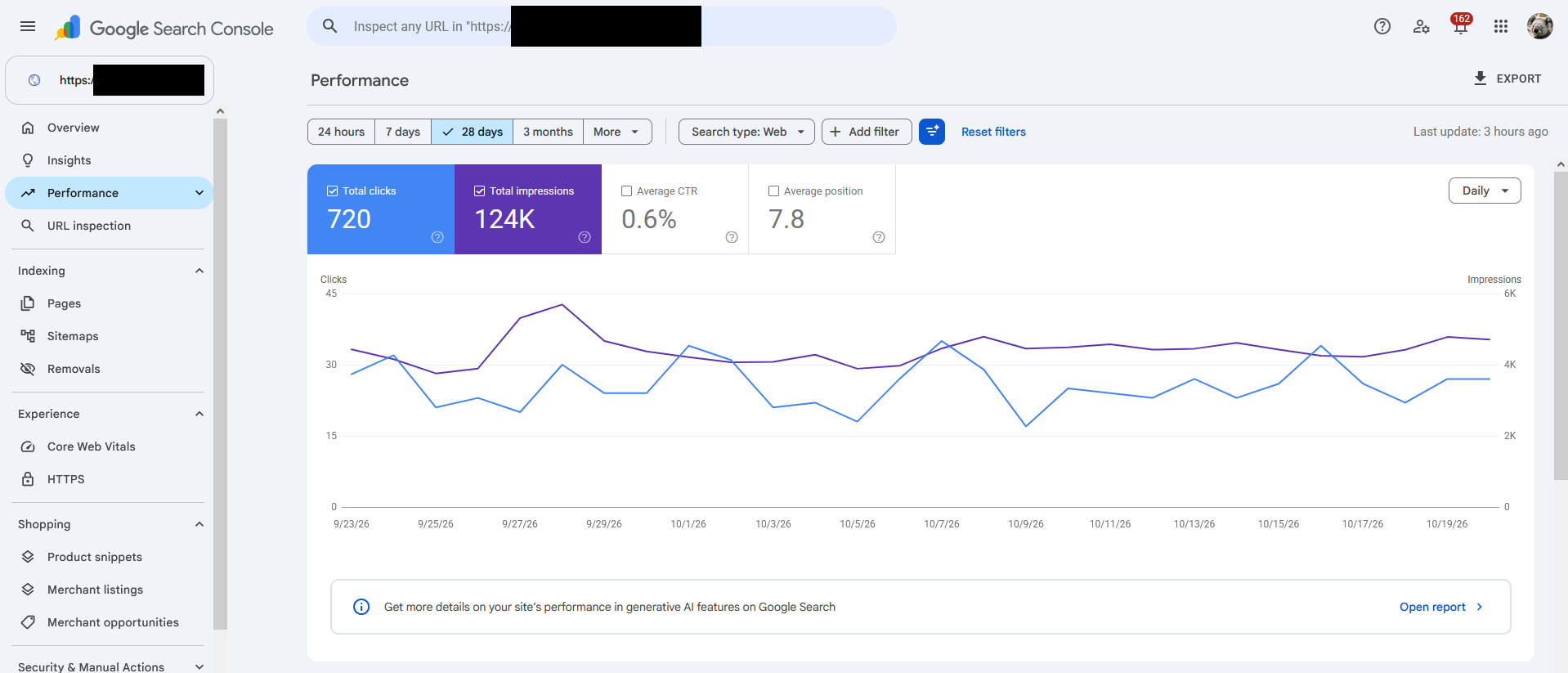
Start by heading to Search Console and look at the Performance tab. You’ll see something like this, which is a graph showing how many clicks and impressions your site got over the specified period, here 28 days.
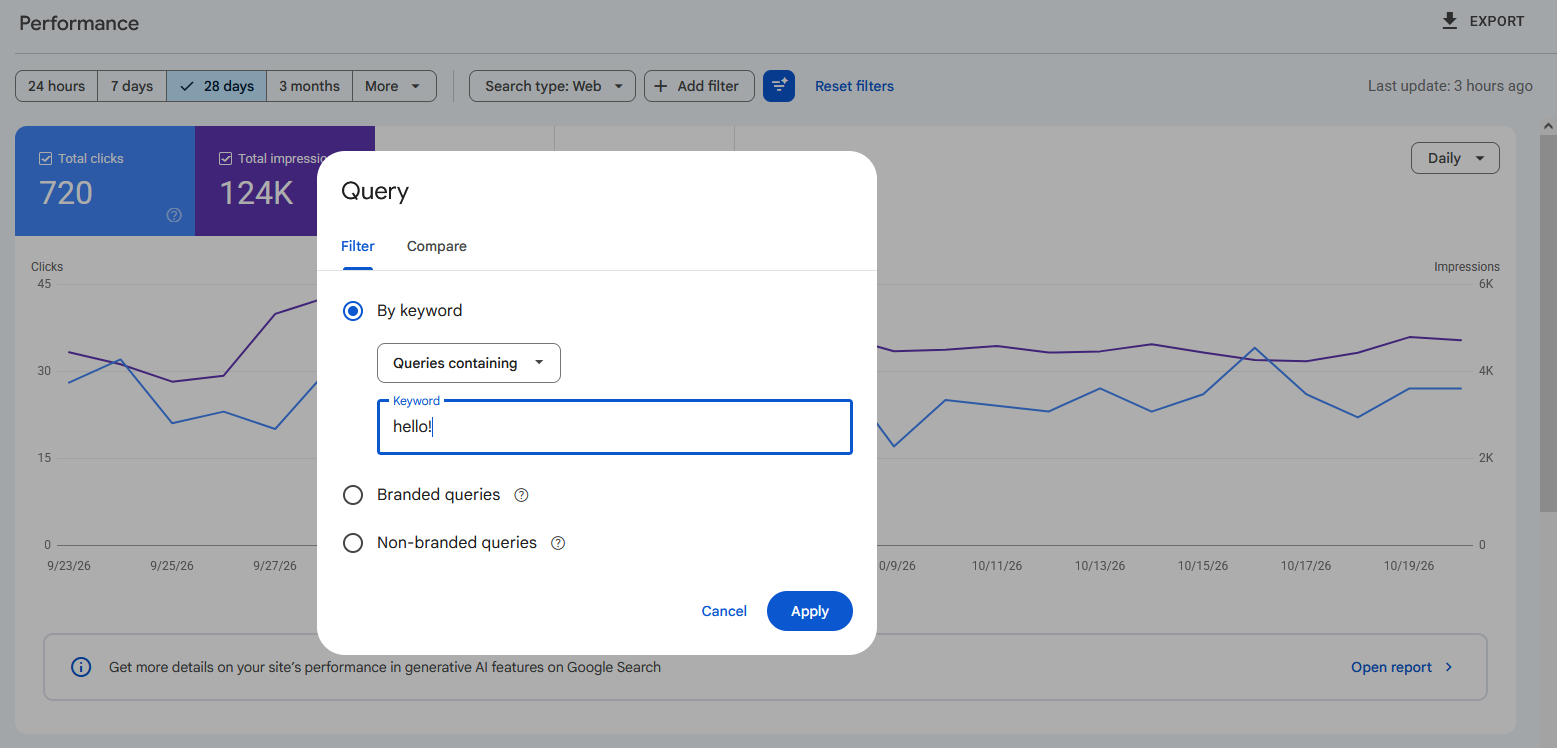
Click on “Add filter” and you’ll see a popup. To check one keyword, choose to filter by query, type the keyword in, and click Apply.
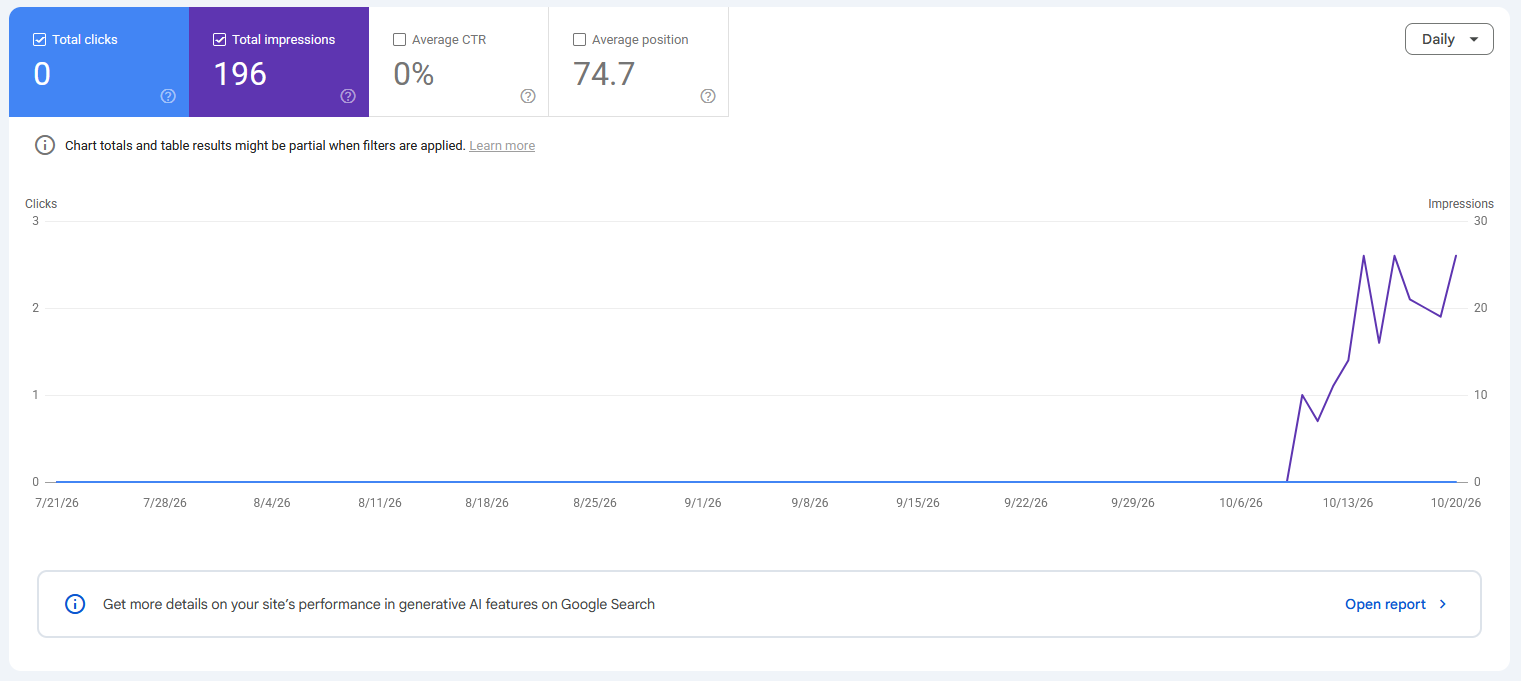
If you’ve just started ranking for a new keyword, you’ll see something like this. Otherwise, you might get a graph that just shows you nothing — i.e. you haven’t started ranking for it yet.
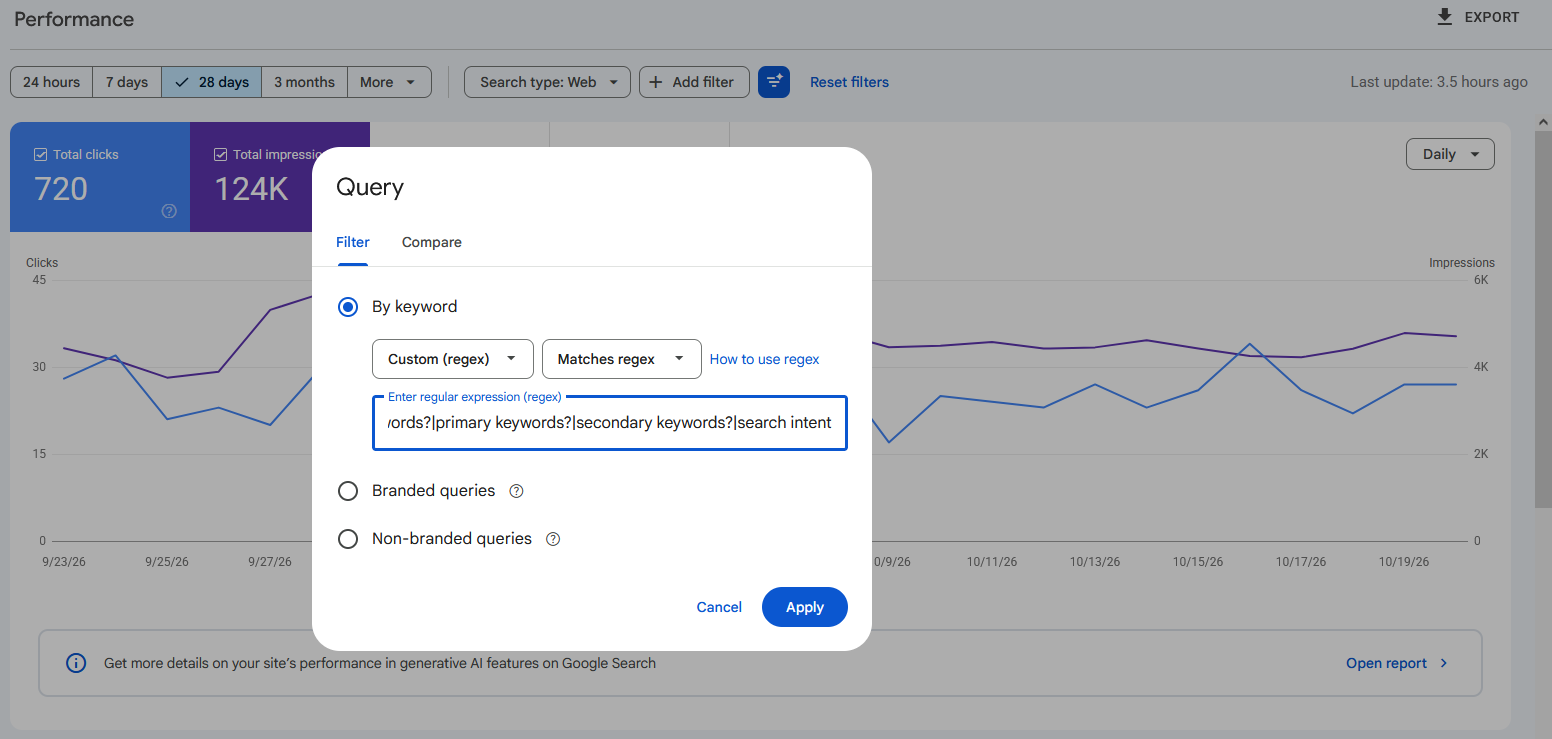
If you want to check ALL of the keywords you identified in your keyword gap analysis, you can; I would recommend using regex. Click on “Add filter” again, and instead of filtering by keyword, filter by “Custom (regex)”. A regex query is like a fancy search function; you can use it to search for multiple things at once, as well as variants of them, which makes it useful here. The best way to generate one of these regex queries is with an LLM, because they’re quite complex (I struggle to get my head around them myself).
Here’s an example. Let’s say I want to check whether the Pollinate site is ranking for the terms keyword density, keyword gap, seasonal keywords, primary keywords, secondary keywords, and search intent. I can’t search for all the keywords that contain the keyword “keyword” (tongue twister) because a) search intent doesn’t fit, and b) there are probably (hopefully) other keywords that contain the keyword that we already rank for. Keyword!
So, what you would do is create the following regex:
keyword density|keyword gap|seasonal keywords?|primary keywords?|secondary keywords?|search intent
The separators mean that each of them should count towards the total separately. And a neat touch, one of the many things regex can do: the “?” at the end of many of the keywords means that both singular and plural versions are counted, i.e. both seasonal keyword and seasonal keywords. Paste it in here, click Apply, and you should see the results for all of those terms combined.
You can then scroll down and look at the QUERIES tab, which should show you all of the keywords and how they’re ranking individually.
Other ways to track keyword performance
There are tons of other ways to track keyword performance. Probably the most beginner- and budget-friendly option outside of GSC is Semrush, which we talked about earlier. If you want to see how you’re performing for keyword gap keywords, set up a Project or just look at your domain overview each day — you can see keywords that you’ve improved in, declined in, started ranking for, or stopped ranking for. You can also run the same keyword gap analysis as before and see if the results change. Other similar tools like Ahrefs require a subscription, so aren’t a good choice here.
There are also tools that specifically help you track how you’re ranking for certain keywords, and that’s all they do, like SERP Robot. You tell them the keywords you want to track and they send you daily/weekly/monthly reports telling you how you’re doing. These tend to be a lot cheaper than your Semrushes and Ahrefses, which is a plus if you’re a small business owner and you wouldn’t be interested in all the bells and whistles you get with MegaPro subscriptions. They don’t tend to be as accurate though, especially these days (again, Google are cracking down on tools like these; they scrape SERPs which has always been against Google’s terms and conditions, but is something they’ve only decided to really care about recently).
I’d definitely recommend using Search Console instead of a third party tool, because even though you don’t get a swish report, the data is better. Plus it’s good to be familiar with how your site’s doing, and how to use these tools.
Need help running a keyword gap analysis, or setting up tracking tools? Or having someone optimise your landing pages, or writing new blogs? Get in touch — Pollinate Marketing can help.